Git 配置
基本配置
查看当前 git 配置
git config --list --local
在当前项目为 git 配置 user 和 mail
样例如下
git config user.name "xxx"
git config user.email "xxxx"
全局配置持久化保存账号密码 token 凭据 (https)
git config --global credential.helper store
使用带账号密码的命令 clone 仓库:
# 模板命令
git clone https://username:password@github.com/username/repository
使用带 token 的命令 clone 仓库:
# github 模板命令
git clone https://token@github.com/username/repository

# gitlab 模板命令
git clone https://oauth2:token@github.com/username/repository


# demo
# github_pat_xxxxxx
git clone https://github_pat_xxxxxx@github.com/LZC6244/maida_leetcode.git
使用 ssh clone (推荐)
多人混用机器推荐
-
需要提前在 git 平台配置 ssh 公钥
-
使用 ssh git clone 项目下来,如
ssh://git@xxx.com/demo.git或者ssh://git@ip:port/demo.git# 临时一次性指定 ssh 私钥路径 GIT_SSH_COMMAND="ssh -i ~/.ssh/gitlab_id_rsa" git clone ssh://git@xxx.com/demo.git # 临时一次性指定 ssh 私钥路径 GIT_SSH_COMMAND="ssh -i ~/.ssh/gitlab_id_rsa" git clone ssh://git@ip:port/demo.git -
进入项目进行配置:
cd demo -
配置全局凭证,使用用户全局的
~/.ssh/config,写入如以下内容Host xxx-git HostName domain/ip Port 22 User git # 私钥路径 IdentityFile ~/.ssh/gitlab_id_rsa # 强制使用指定密钥 IdentitiesOnly yes此时 git clone 命令为:
git clone git@xxx-git/demo.git,使用上述配置的别名git commit 等之前还需要进行下面的操作,配置用户名和邮箱
git config user.name "xxx" git config user.email "xxx@xxxx.com" -
配置独立凭证,不使用用户全局的
~/.ssh/config# 在项目根路径执行下面的命令 # 配置当前项目的 SSH 命令:指定私钥 git config core.sshCommand "ssh -i ~/.ssh/你的私钥文件(如gitlab_id_rsa)" # 如果使用 git 地址为 ip:port ,需要指定端口 git config core.sshCommand "ssh -i ~/.ssh/你的私钥文件(如gitlab_id_rsa) -p 22" # 查看 .git/config 文件 cat .git/config查看 .git/config 文件,
cat .git/config,会看到类似下面的新增配置段[core] repositoryformatversion = 0 filemode = true bare = false logallrefupdates = true # 新增的项目级配置 sshCommand = ssh -i ~/.ssh/gitlab_id_rsa -p 22 [remote "origin"] url = ssh://git@ip:port/demo.git fetch = +refs/heads/*:refs/remotes/origin/* -
后续使用:直接执行 git 命令即可,如:
git pull、git push
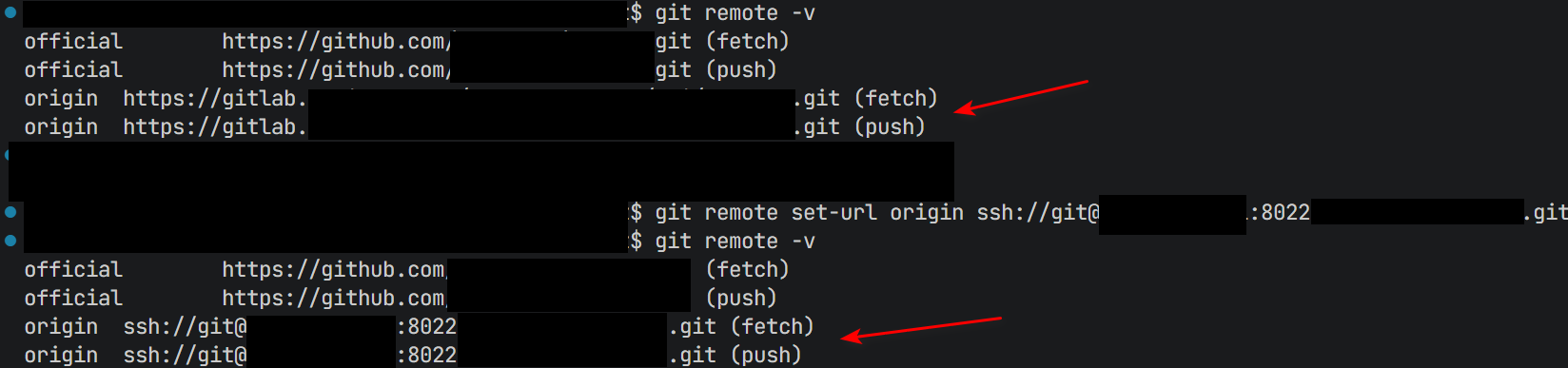
【可选】将当前 https clone 的项目更改为 ssh 地址
# ssh 地址为:ssh://git@xxx.com/demo.git 或者 ssh://git@ip:port/demo.git
git remote set-url origin ssh://git@ip:port/demo.git

# 确认是否更改成功
git remote -v
配置代理
以下的 http://127.0.0.1:7078 请根据时间情况替换代理地址和端口
# 方案 1 :临时在当前终端配置 http 和 https 代理
# 设置 HTTP 代理
export http_proxy=http://127.0.0.1:7078
# 设置 HTTPS 代理
export https_proxy=http://127.0.0.1:7078


# 方案 2 :为当前 git 项目配置代理
git config http.proxy http://127.0.0.1:7078
git config https.proxy http://127.0.0.1:7078

# 为当前 git 项目取消配置代理
git config --unset http.proxy
git config --unset https.proxy


# 方案 3 :git 配置全局代理
git config --global http.proxy http://127.0.0.1:7078
git config --global https.proxy http://127.0.0.1:7078

# git 取消配置全局代理
git config --global --unset http.proxy
git config --global --unset https.proxy
刷新远程分支列表
# 此处以 origin 远程源(默认)为例
git remote update origin --prune
参考文档