minio
部署
docker compose
示例如下
name: minio

services:

  minio:
    image: minio/minio:RELEASE.2024-04-18T19-09-19Z
    restart: always
    environment:
      MINIO_ROOT_USER: minioadmin(minio_admin)(xxxxx)
      MINIO_ROOT_PASSWORD: xxxxxxxx
    ports:
      - 9001:9001
      - 9000:9000
    volumes:
      - ../volumes/minio/data:/minio_data
      - ../volumes/minio/entrypoint.sh:/entrypoint.sh
    # command: minio server /minio_data --console-address ":9001"
    entrypoint: [ "/bin/bash" ]
    command: [ "-x", "-c", "/entrypoint.sh" ]
    healthcheck:
      test: ["CMD", "curl", "-f", "http://localhost:9000/minio/health/live"]
      interval: 30s
      timeout: 20s
      retries: 3

networks:
  default:
    ipam:
      config:
        - subnet: 172.18.5.0/28
    driver: bridge
在 minio 启动时自动创建指定 bucket 的脚本示例如下
如不需要自动创建,可以在 docker compose 中将启动命令更改为使用 command: minio server /minio_data --console-address ":9001"
#!/bin/sh

# 后台启动 minio 服务
# /usr/bin/docker-entrypoint.sh minio server /data --console-address ":9001" &
minio server /minio_data --console-address ":9001" &

# 等待 minio 服务就绪
wait_for_minio() {
  echo "等待 minio 服务启动..."
  while ! mc config host add myminio http://localhost:9000 "$MINIO_ROOT_USER" "$MINIO_ROOT_PASSWORD" --api S3v4 > /dev/null 2>&1; do
    sleep 2
  done
  echo "minio 服务已就绪"
}

# 创建私有 bucket ,忽略重名
create_private_bucket() {
  local bucket_name="*$1*"
  if ! mc ls myminio/"$bucket_name" > /dev/null 2>&1; then
    echo "创建私有 bucket: $bucket_name"
    mc mb myminio/"$bucket_name"
  else
    echo "跳过已存在私有 bucket: $bucket_name"
  fi
}

# 创建公开 bucket ,忽略重名
create_public_read_bucket() {
  local bucket_name="*$1*"
  if ! mc ls myminio/"$bucket_name" > /dev/null 2>&1; then
    echo "创建公开根路径私有 bucket: $bucket_name"
    mc mb myminio/"$bucket_name"
    mc anonymous set download myminio/"$bucket_name"
    echo "已设置根路径公开可读: $bucket_name"
  else
    echo "跳过已存在公开根路径私有 bucket: $bucket_name"
  fi
}

# 执行初始化流程
wait_for_minio
create_private_bucket "$MINIO_BUCKETS_PRIVATE"
create_public_read_bucket MINIO_BUCKETS_PUBLIC_READ

# 等待 minio 服务主进程(保持容器运行)
wait $!
nginx 代理转发
配置示例
# nginx 配置参考地址:https://min.io/docs/minio/linux/integrations/setup-nginx-proxy-with-minio.html

upstream minio-s3 {
     server master:19000 weight=1;
    #  server slave1:19000 weight=4;
}

server {

    listen 29000;

    # Allow special characters in headers
    ignore_invalid_headers off;
    # Allow any size file to be uploaded.
    # Set to a value such as 1000m; to restrict file size to a specific value
    client_max_body_size 0;
    # Disable buffering
    proxy_buffering off;
    proxy_request_buffering off;

    location / {

      proxy_set_header Host $http_host;
      proxy_set_header X-Real-IP $remote_addr;
      proxy_set_header X-Forwarded-For $proxy_add_x_forwarded_for;
      proxy_set_header X-Forwarded-Proto $scheme;

      # Default is HTTP/1, keepalive is only enabled in HTTP/1.1
      proxy_http_version 1.1;
      proxy_set_header Connection "";
      chunked_transfer_encoding off;

      proxy_pass http://minio-s3; # This uses the upstream directive definition to load balance

      # 节点异常配置
      proxy_connect_timeout 30s;
      proxy_read_timeout 60s;
      proxy_send_timeout 60s;
      proxy_next_upstream error timeout invalid_header http_500 http_502 http_503 http_504;
      proxy_next_upstream_tries 2;

    }
}
特定需求
为指定 bucket 配置公开读,鉴权写
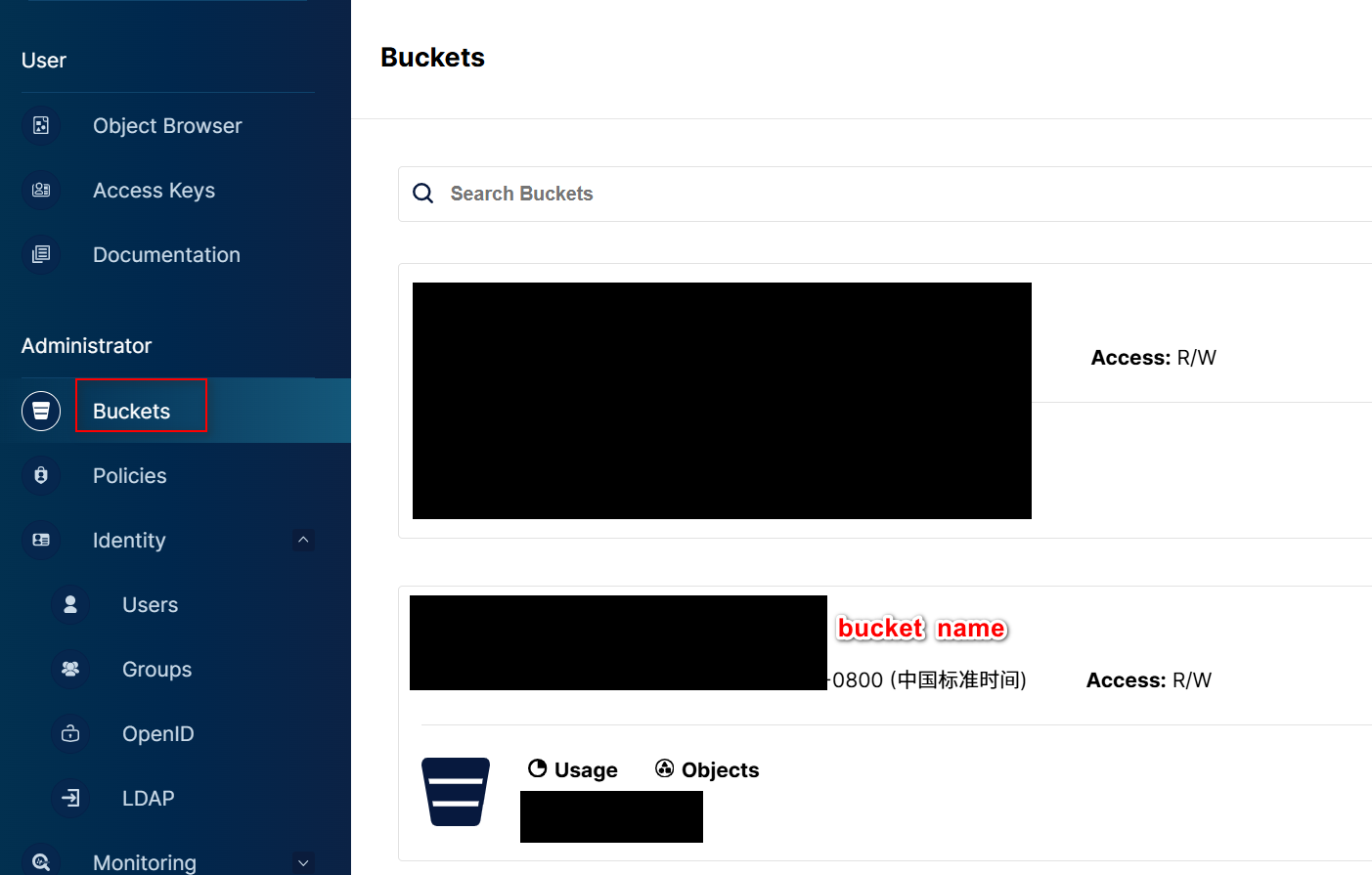
登入 minio web 控制台,如:http://ip:port(9001)/
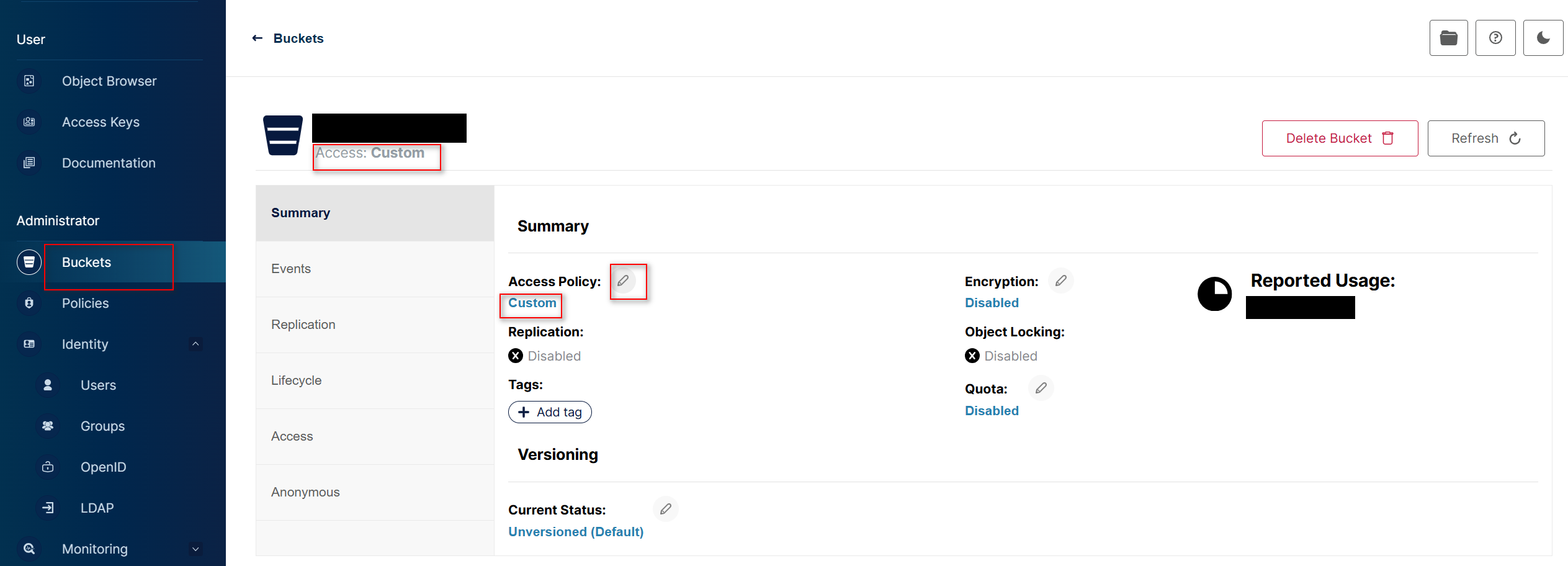
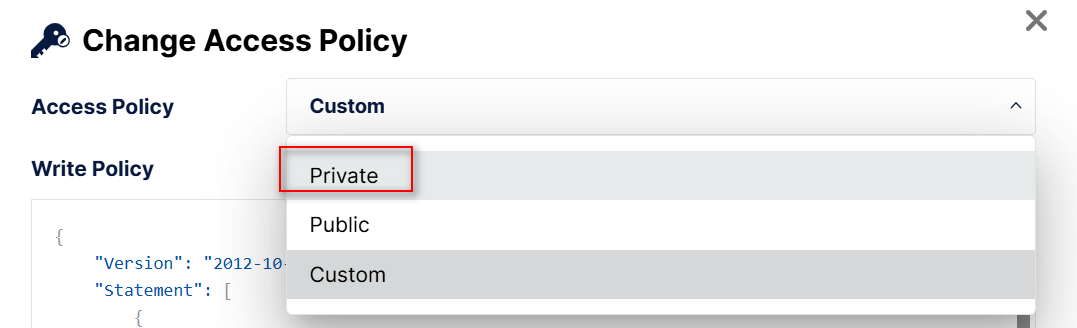
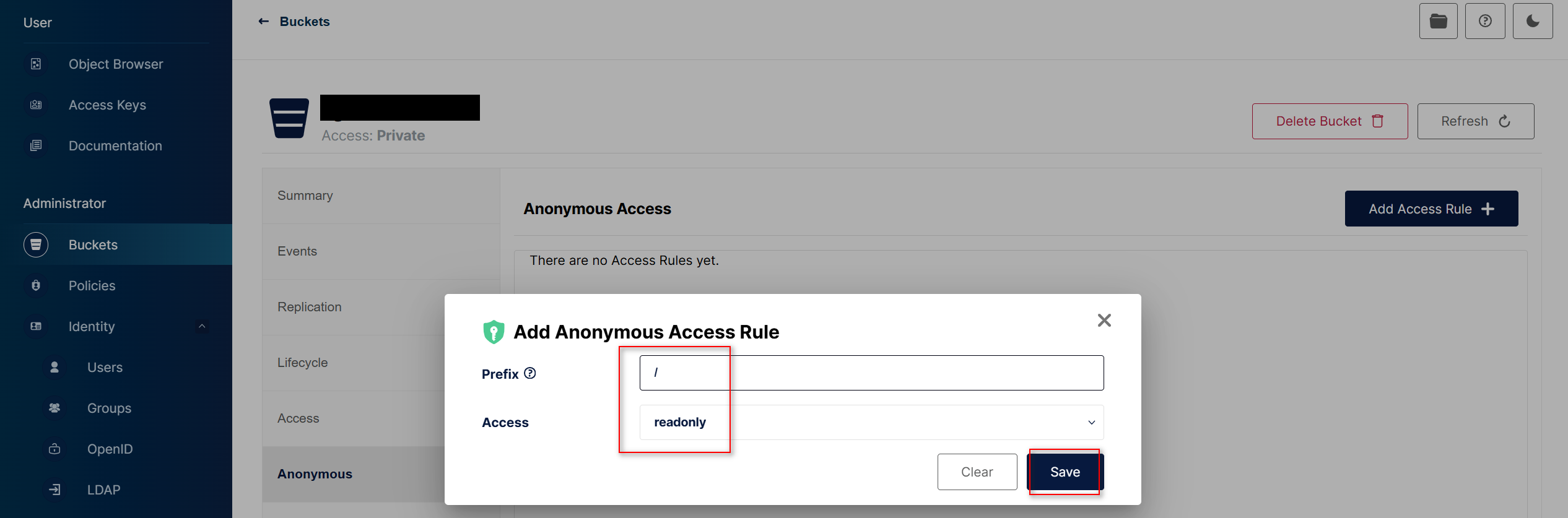
进入 buckets 管理界面,选择要操作的 bucket,先将其改/确认其为 private 私有
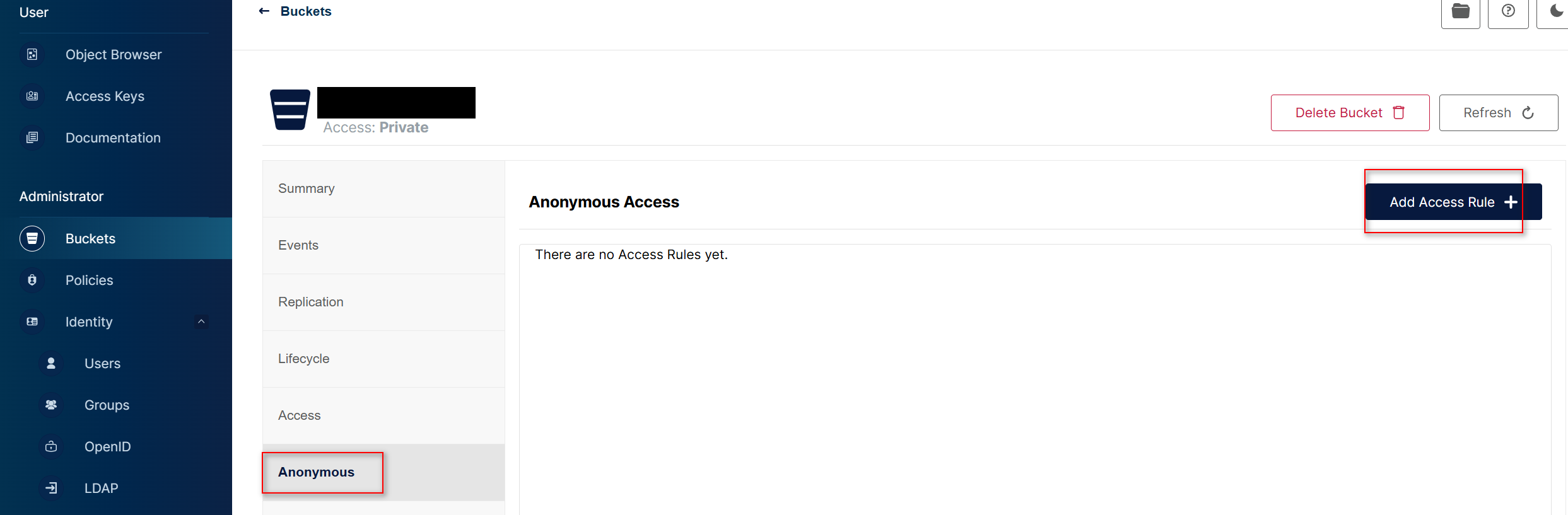
添加一条匿名访问规则,允许访问该 bucket 全部路径,配置为 readonly
验证
发包工具(apipost)验证
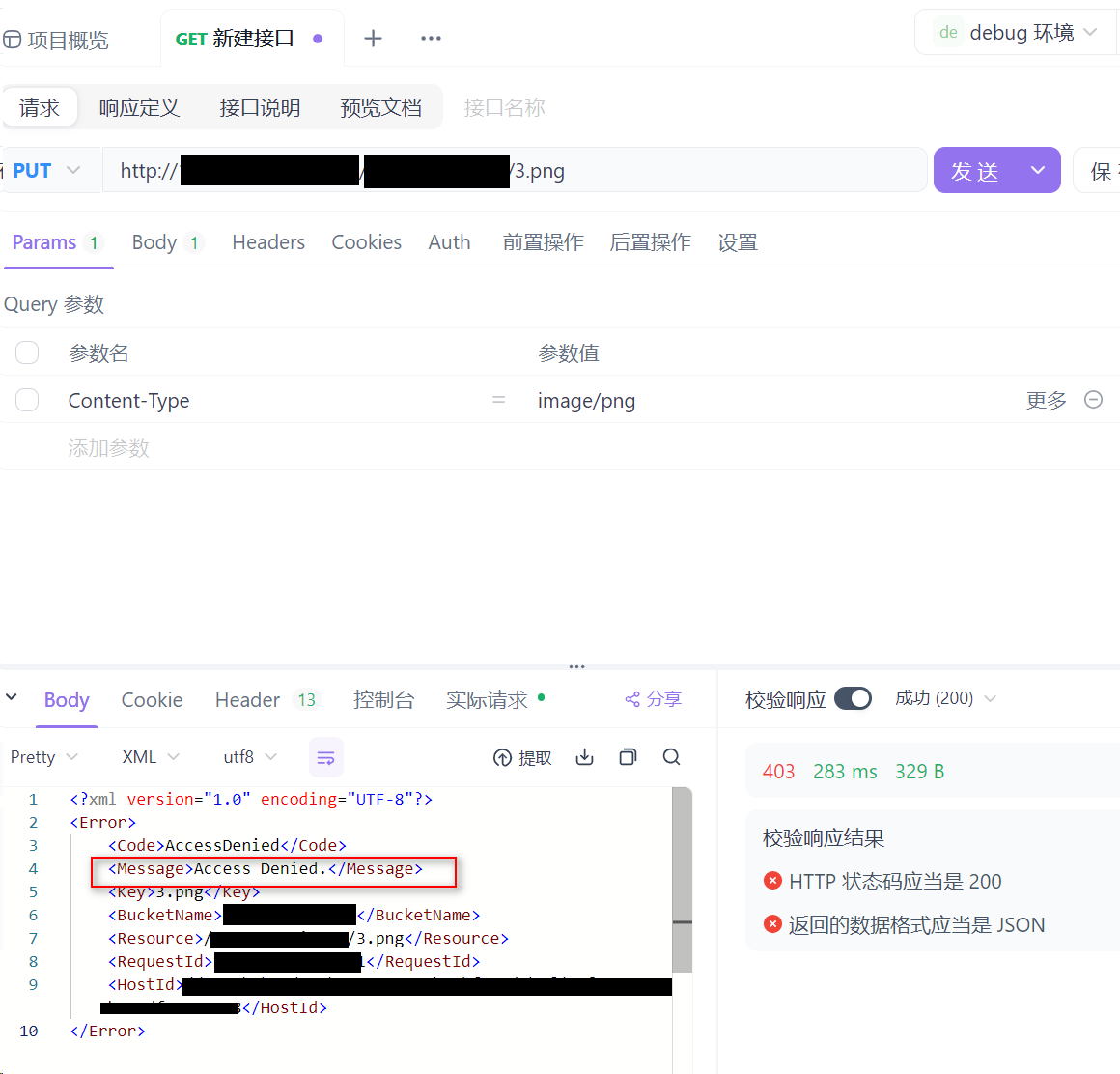
curl 验证
curl --location --request PUT 'http://ip:port/bucket_name/3.png'
--header 'Content-Type: application/octet-stream'
--data-binary '@C:UsersxxxxDownloads3.png'