RPC 方式过 JS 逆向
什么是 RPC ?
RPC 全称远程过程调用(Remote Procedure Call),是一个计算机通信协议。
简单来说可以做到在远程调用程序时,像本地调用一样方便,让调用者感知不到远程调用的逻辑。
RPC 对我们有什么用?
举个例子,请求a中的加密参数b由加密函数c通过一系列信息(如搜索条件、帐号密码等)生成。
一般情况下,我们会通过扣代码、补环境、还原加解密算法等方式解决
正统,效率最高!虽然可能会开发进度慢一些,但是可以提高逆向技术哟Ψ( ̄∀ ̄)Ψ
然后就是,反爬稍弱的,我们可以用selenium、splash、playwright等解决。
现在这些很多都会被检测到啦,而且是真滴慢…(⊙_⊙;)…极其不推荐
如果加密函数c能像本地函数一样调用,我们传个参就好了那该多好啊 = =
喏,RPC不就是来解决这个滴?
简单说下思路吧:
- 我们要在本地/爬虫服务器实现一个
websocket服务端,其能够接收加密参数并返回加密结果
(服务端步骤结束) - 实现一个
websocket客户端能调用加密函数c,能接收传过来的加密参数并返回相应结果
(就和扣代码那些一样 ,把加密函数c暴露出来(譬如绑定到window)给websocket客户端调用) - 将实现的
websocket客户端就像hook cookie之类操作一样注入到网页
(可以使用 fiddler 替换或者 Chrome Overrides 功能等实现注入) - 将
websocket客户端配置为自执行函数(避免污染原网页代码逻辑)
(客户端步骤结束) - 服务端发送加密参数给客户端,客户端调用加密函数
c处理加密参数,返回加密后结果给客户端
RPC 简单实现
- 服务端代码(Python)
# -*- coding: utf-8 -*- import sys import asyncio import websockets async def receive_msg(websocket): while True: msg = input('请输入待加密字符串:').strip() await websocket.send(msg) if msg == 'exit': sys.exit(0) result = await websocket.recv() print(f'得到加密结果:{result}') if __name__ == "__main__": ws_serve = websockets.serve(receive_msg, '127.0.0.1', 8765) asyncio.get_event_loop().run_until_complete(ws_serve) asyncio.get_event_loop().run_forever() - 客户端代码( JS ,新建标签页后在控制台输入以下代码即可)
!(function () { var ws = new WebSocket('ws://127.0.0.1:8765'); ws.onmessage = function (evt) { console.log('接收到待加密字符串:' + evt.data); if (evt.data == 'exit') { ws.close(); } else { var result = btoa(evt.data); console.log('得到加密结果:' + result) ws.send(result) } }; })() - 操作步骤:先启动服务端,后启动客户端
以调用浏览器btoa函数为例,如下图
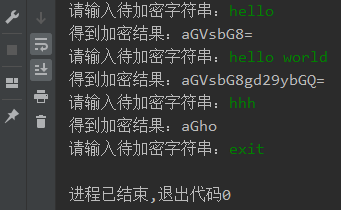
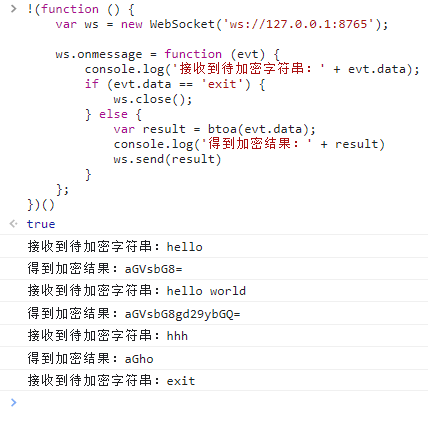
- 虽然可以自己实现服务端和客户端,但很显然功能比较单一且不易拓展。
有没有好用的、现成的轮子呢?
那肯定是有了。比较常见的是 Sekiro (依赖 java 环境) 和 JsRpc (使用 go 编译)。
这里我选择的是 Sekiro
一是因为我本地已有 java 环境
二是因为 Sekiro 还能在安卓 app 中使用
如何使用已有 RPC 框架:Sekiro
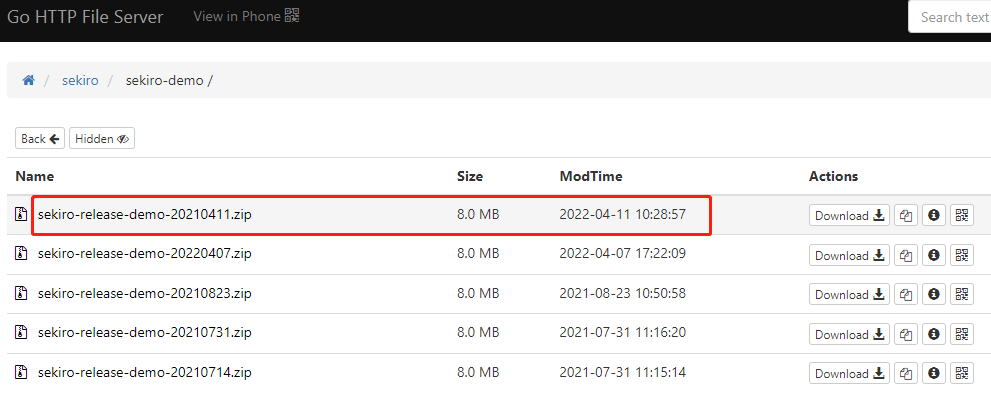
- 安装服务端 :这里选择的是使用作者已构建好的压缩包 sekiro-release-demo-20210411.zip
根据文件名和网页上显示的修改时间,可知截止目前为止应该此版本是最新的(应该是作者命名失误了)
- 启动服务端
- bin/sekiro.sh :mac or linux
- bin/sekiro.bat :windows
- 将客户端代码注入浏览器环境 :官方 demo 是将 sekiro_web_client.js 和通信代码直接注入浏览器环境的。
在这里,为了避免污染原网页逻辑,我们选择将 sekiro_web_client.js 和通信代码组合到同一个自执行函数。
完整代码如下(上半部分为 sekiro_web_client.js ,下半部分为通信代码):!function (){ // sekiro_web_client.js function SekiroClient(wsURL) { this.wsURL = wsURL; this.handlers = {}; this.socket = {}; // check if (!wsURL) { throw new Error('wsURL can not be empty!!') } this.webSocketFactory = this.resolveWebSocketFactory(); this.connect() } SekiroClient.prototype.resolveWebSocketFactory = function () { if (typeof window === 'object') { var theWebSocket = window.WebSocket ? window.WebSocket : window.MozWebSocket; return function (wsURL) { function WindowWebSocketWrapper(wsURL) { this.mSocket = new theWebSocket(wsURL); } WindowWebSocketWrapper.prototype.close = function () { this.mSocket.close(); }; WindowWebSocketWrapper.prototype.onmessage = function (onMessageFunction) { this.mSocket.onmessage = onMessageFunction; }; WindowWebSocketWrapper.prototype.onopen = function (onOpenFunction) { this.mSocket.onopen = onOpenFunction; }; WindowWebSocketWrapper.prototype.onclose = function (onCloseFunction) { this.mSocket.onclose = onCloseFunction; }; WindowWebSocketWrapper.prototype.send = function (message) { this.mSocket.send(message); }; return new WindowWebSocketWrapper(wsURL); } } if (typeof weex === 'object') { // this is weex env : https://weex.apache.org/zh/docs/modules/websockets.html try { console.log("test webSocket for weex"); var ws = weex.requireModule('webSocket'); console.log("find webSocket for weex:" + ws); return function (wsURL) { try { ws.close(); } catch (e) { } ws.WebSocket(wsURL, ''); return ws; } } catch (e) { console.log(e); //ignore } } //TODO support ReactNative if (typeof WebSocket === 'object') { return function (wsURL) { return new theWebSocket(wsURL); } } // weex 和 PC环境的websocket API不完全一致,所以做了抽象兼容 throw new Error("the js environment do not support websocket"); }; SekiroClient.prototype.connect = function () { console.log('sekiro: begin of connect to wsURL: ' + this.wsURL); var _this = this; // 不check close,让 // if (this.socket && this.socket.readyState === 1) { // this.socket.close(); // } try { this.socket = this.webSocketFactory(this.wsURL); } catch (e) { console.log("sekiro: create connection failed,reconnect after 2s"); setTimeout(function () { _this.connect() }, 2000) } this.socket.onmessage(function (event) { _this.handleSekiroRequest(event.data) }); this.socket.onopen(function (event) { console.log('sekiro: open a sekiro client connection') }); this.socket.onclose(function (event) { console.log('sekiro: disconnected ,reconnection after 2s'); setTimeout(function () { _this.connect() }, 2000) }); }; SekiroClient.prototype.handleSekiroRequest = function (requestJson) { console.log("receive sekiro request: " + requestJson); var request = JSON.parse(requestJson); var seq = request['__sekiro_seq__']; if (!request['action']) { this.sendFailed(seq, 'need request param {action}'); return } var action = request['action']; if (!this.handlers[action]) { this.sendFailed(seq, 'no action handler: ' + action + ' defined'); return } var theHandler = this.handlers[action]; var _this = this; try { theHandler(request, function (response) { try { _this.sendSuccess(seq, response) } catch (e) { _this.sendFailed(seq, "e:" + e); } }, function (errorMessage) { _this.sendFailed(seq, errorMessage) }) } catch (e) { console.log("error: " + e); _this.sendFailed(seq, ":" + e); } }; SekiroClient.prototype.sendSuccess = function (seq, response) { var responseJson; if (typeof response == 'string') { try { responseJson = JSON.parse(response); } catch (e) { responseJson = {}; responseJson['data'] = response; } } else if (typeof response == 'object') { responseJson = response; } else { responseJson = {}; responseJson['data'] = response; } if (Array.isArray(responseJson)) { responseJson = { data: responseJson, code: 0 } } if (responseJson['code']) { responseJson['code'] = 0; } else if (responseJson['status']) { responseJson['status'] = 0; } else { responseJson['status'] = 0; } responseJson['__sekiro_seq__'] = seq; var responseText = JSON.stringify(responseJson); console.log("response :" + responseText); this.socket.send(responseText); }; SekiroClient.prototype.sendFailed = function (seq, errorMessage) { if (typeof errorMessage != 'string') { errorMessage = JSON.stringify(errorMessage); } var responseJson = {}; responseJson['message'] = errorMessage; responseJson['status'] = -1; responseJson['__sekiro_seq__'] = seq; var responseText = JSON.stringify(responseJson); console.log("sekiro: response :" + responseText); this.socket.send(responseText) }; SekiroClient.prototype.registerAction = function (action, handler) { if (typeof action !== 'string') { throw new Error("an action must be string"); } if (typeof handler !== 'function') { throw new Error("a handler must be function"); } console.log("sekiro: register action: " + action); this.handlers[action] = handler; return this; }; // 以下是通信代码 function guid() { function S4() { return (((1+Math.random())*0x10000)|0).toString(16).substring(1); } return (S4()+S4()+"-"+S4()+"-"+S4()+"-"+S4()+"-"+S4()+S4()+S4()); } var client = new SekiroClient("ws://127.0.0.1:5620/business-demo/register?group=ws-group&clientId="+guid()); client.registerAction("clientTime",function(request, resolve,reject ){ resolve("ddd - "+new Date()); }) client.registerAction("atob",function(request, resolve,reject ){ var msg=request['msg']; if (!msg){ reject('need param:{msg}') } console.log('[atob] msg is '+msg) resolve(atob(msg)); }) client.registerAction("btoa",function(request, resolve,reject ){ var msg=request['msg']; if (!msg){ reject('need param:{msg}') } console.log('[btoa] msg is '+msg) resolve(btoa(msg)); }) }() - 客户端和服务端通信
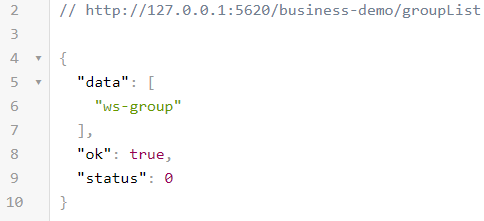
- 查看分组列表:http://127.0.0.1:5620/business-demo/groupList
- 查看队列状态:http://127.0.0.1:5620/business-demo/clientQueue?group=ws-group
- 远程调用转发
- http://127.0.0.1:5620/business-demo/invoke?group=ws-group&action=clientTime
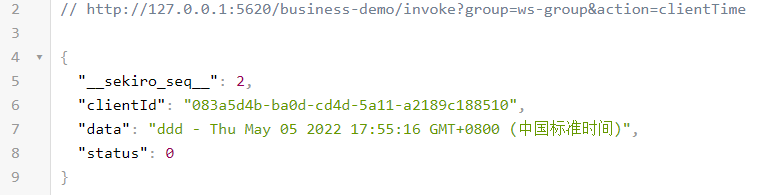
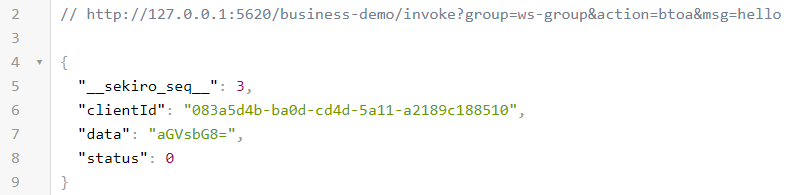
- http://127.0.0.1:5620/business-demo/invoke?group=ws-group&action=btoa&msg=hello
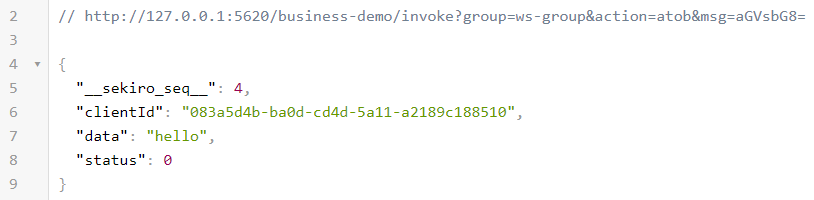
- http://127.0.0.1:5620/business-demo/invoke?group=ws-group&action=atob&msg=aGVsbG8=
- http://127.0.0.1:5620/business-demo/invoke?group=ws-group&action=clientTime
- 查看分组列表:http://127.0.0.1:5620/business-demo/groupList
- 基本的使用就说完了,详情请看 Sekiro 官方文档
- 哦,对了,别忘了在实际使用 RPC 的场景中,浏览器环境注入了客户端和通信代码后
要记得先让浏览器运行到注入的那部分代码场景!! 譬如,你注入到登录部分的代码,你总得登录一次,让我们注入的代码执行把 = =